Less chaos
Everything important is organized centrally.

FamilyPlan brings calendars, tasks, shopping lists, meals, school schedules, rewards, budgeting and a review-first AI assistant together.


Appointments in one place, shopping lists somewhere else, tasks in your head and school updates buried in chat? FamilyPlan brings your everyday family planning together in one calm place.
Everything important is organized centrally.
Parents and kids can see what matters today.
Tasks, points and rewards make routines more motivating.
From shared calendars to budgeting, FamilyPlan connects the routines families need most in a calm, kid-friendly app.
The FamilyPlan AI assistant can summarize the day and prepare drafts for events, tasks, shopping lists, meals and recipe ideas.
Proposed changes are shown individually and saved only after review by an authorized adult profile.
Explore the AI family assistantFamilyPlan helps families plan appointments, school events, doctor visits and activities together.
Parents and kids can see what matters today and what is coming up next.
View family calendarTasks, routines and small goals make family organization easier to understand.
The reward system supports kids in a positive way and makes completed tasks visible.
Organize tasks for kidsShared shopping lists keep household needs in one place.
Family members can add items before someone goes shopping, so fewer small things get forgotten.
Plan family shopping listsFamilyPlan connects meal planning, favorite recipes and shopping.
Weekly planning gets easier when everyone knows what is planned and which ingredients are missing.
Explore meal planningFamilyPlan helps families keep lessons, school days and important school events visible.
Especially with several children, one shared place makes school and family planning easier to connect.
View school planningFamilyPlan helps collect expenses, shared costs and recurring payments in a simple overview.
Shopping, household routines and the family budget fit together more clearly.
View family budgetingShort reminders, questions and decisions can stay where calendars, tasks and shopping are planned.
That reduces scattered information and makes family decisions easier to find later.
View FamilyPlan screenshotsFamilyPlan uses voluntary location sharing so families can share places transparently when it helps.
Sharing stays controllable and is never designed as hidden tracking.
View privacy and sharingNew in FamilyPlan
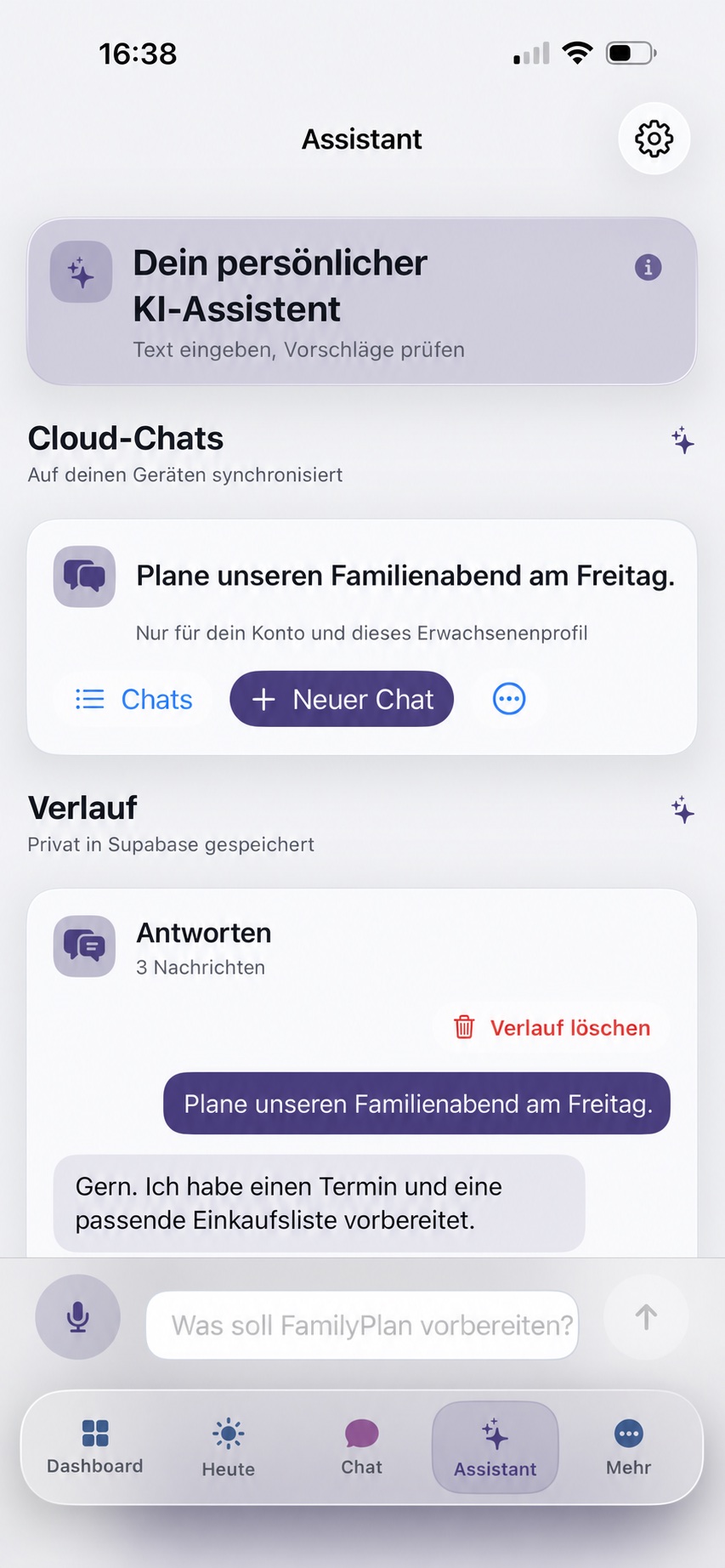
The personal FamilyPlan AI assistant can summarize the day, draft events, tasks, shopping lists and meal plans, and show every suggested change before it is saved.
Ask for a clear overview of appointments, open tasks and important family plans.
Draft events, tasks, shopping items, meal plans and recipe ideas.
Inspect, adjust, confirm or discard each suggestion individually.
FamilyPlan on more devices
FamilyPlan is expanding one platform at a time, with a clear distinction between what is ready to use and where feedback is still needed.
The web version is already online and connects to the same FamilyPlan family data as the app. It is now available as a public beta on desktop, tablet and mobile browsers.
We are looking for families with an Android device who can remain opted in for at least 14 days and share practical feedback.
Real FamilyPlan app screens show how calendar, tasks, chat, budget, school and rewards come together in everyday family life.
Family, tasks, calendar and key areas in one overview.

Daily overview with events, tasks and meal planning.

Routines, to-dos and stars for completed tasks.

Family events and imported calendars in one place.

Family messages and groups stay together.

Income, expenses and recurring payments at a glance.

Rewards, goals and motivation for kids and parents.

School schedules per child and holidays clearly planned.
FamilyPlan guides
The FamilyPlan blog shares concrete routines, planning methods and product insights. Each guide answers a real family question and links to relevant features.
Read all guidesFamily organization gets easier when a few dependable routines replace repeated last-minute coordination.
Read guideChildren can take responsibility when tasks are concrete, manageable and explained consistently.
Read guideA family assistant is useful when it prepares clear drafts without silently making decisions for the family.
Read guideFamilyPlan Premium is available as a monthly or annual subscription. Both subscriptions start with 1 month free.
Ideal for trying FamilyPlan.

For families who want to organize more together. Start with 1 month free.
FamilyPlan is meant to support parents and give children orientation. Sharing stays clear, voluntary and easy to change.
FamilyPlan is a family organizer app for families who want to manage calendars, tasks, shopping lists, meals, school schedules, rewards, family chat, budgeting and a review-first AI assistant together. It is developed by Mario Euchner, available for iPhone and iPad in the App Store, and usable as a public web beta. FamilyPlan is currently looking for at least 12 people for closed Android testing. Privacy, support, legal notice and data deletion information are publicly available on familyplan.cloud.
Short answers to help parents decide whether FamilyPlan fits their family life.
FamilyPlan is a family organizer app that helps families manage calendars, tasks, shopping lists, meals, school schedules, rewards and budgeting together.
FamilyPlan is made for families, parents and children who want a clearer everyday plan and easier task sharing.
FamilyPlan is available for iPhone and iPad in the App Store and as a public web beta. Closed Google Play testing is being prepared for Android.
Yes. FamilyPlan includes tasks for kids and a reward system so families can organize routines, responsibilities and small goals more easily.
Yes. FamilyPlan includes shopping lists, meals and recipes so planning and shopping fit together more naturally.
FamilyPlan starts with a free plan. FamilyPlan Premium costs 3.99 USD per month or 39.99 USD per year. Both subscriptions start with 1 month free.
It can answer daily overview questions and prepare reviewable drafts for events, tasks, shopping items, meal plans and recipe ideas. Changes are not saved without confirmation.
Yes. The FamilyPlan web app is available as a public beta at familyplan.cloud/app and syncs supported areas with family data.
We are looking for at least 12 people with an Android device and Google Account who can remain opted in for 14 continuous days and share feedback.
Download FamilyPlan from the App Store and make everyday organization easier.
Available for iPhone and iPad. Web beta open. Android testers wanted.